 Batteries
Every battery, at a glance.
Batteries shows the charge of your Mac and every connected Bluetooth device, including AirPods, Magic Keyboard, Magic Mouse, Magic Trackpad, headphones and game controllers, in one shelf widget. Each device gets a ring with its level and a charging badge.
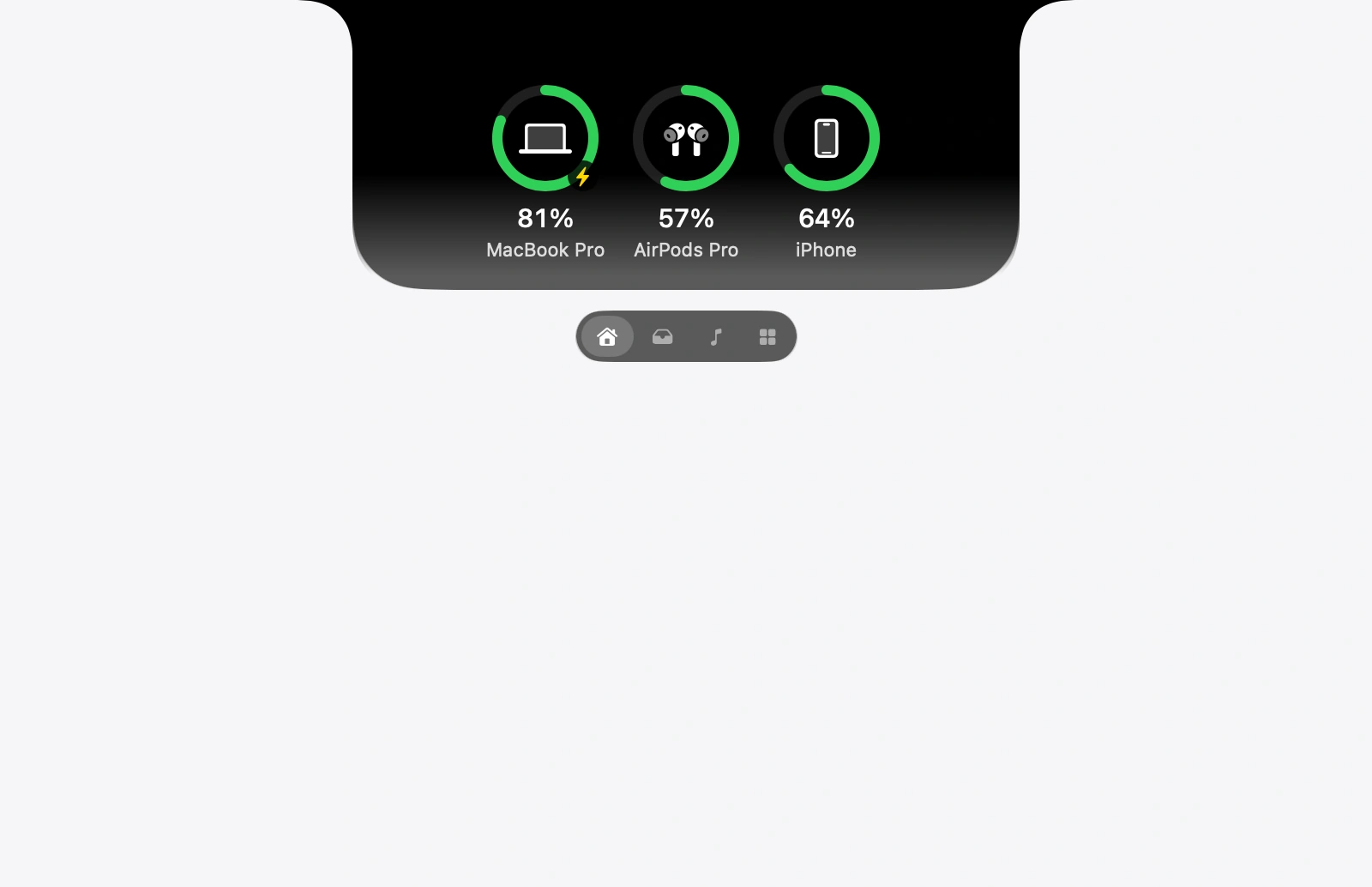
Free with Droppy. Open the Droplet Store to get started.
See Batteries in action
What it does
When a device drops below the level you choose, Batteries shows one card in the notch and stays quiet until that device recovers. What Droppy already warns about is left out by default, and alerts can be switched per device.
Levels come from Bluetooth, AirPods broadcasts and, with libimobiledevice installed, your iPhone or iPad. A device that stops responding stays listed, dimmed, for a day instead of vanishing.
Explore more
Related features

Shelf Widgets
Pomodoro, the weather, CPU graphs, notes and more, side by side in your notch in the order you pick.
Learn more
System HUDs
Volume, brightness and keyboard backlight, redesigned to grow out of the notch.
Learn more
System Stats
Track CPU, RAM, GPU, battery, network and more as live numbers with a rolling history graph in your notch.
Learn more
Ready to try Droppy?
Every feature and every Droplet, one price, yours for good.
Download for macOS