


Pomodoro is usually described as twenty-five minutes of work followed by five minutes away. That is a useful starting point, but the timer is the easy part. The real challenge is deciding what deserves the next block, making the boundary visible, and stopping when the block ends.
I use the method as a small contract with myself. One block gets one clear outcome. Everything else can wait until the timer finishes. The workflow below is deliberately light enough to survive a normal Mac workday, including messages, meetings, and tasks that do not fit neatly into twenty-five minutes.
Choose an outcome before choosing a duration
Write down what should be different when the timer ends. “Work on the website” is too broad. “Rewrite the pricing section” or “review the three open bug reports” gives the block a finish line. If the outcome is larger than one session, choose the next visible piece instead of pretending the whole project belongs inside one timer.
Only then choose the duration. Twenty-five minutes is good when I am resisting the start. Fifty minutes is better when the work has setup cost and I already know where I am going. A short five or ten minute block is useful for email or an administrative sweep. The point is not to obey one sacred interval. It is to make a deliberate promise that is small enough to keep.
A rough guide, adjust to your work.
Put the timer where it can be glanced at, not watched
A timer hidden behind another window is easy to forget. A large floating clock becomes another thing competing for attention. I prefer a compact timer at the top of the display: present when I need to check it, quiet while I work.
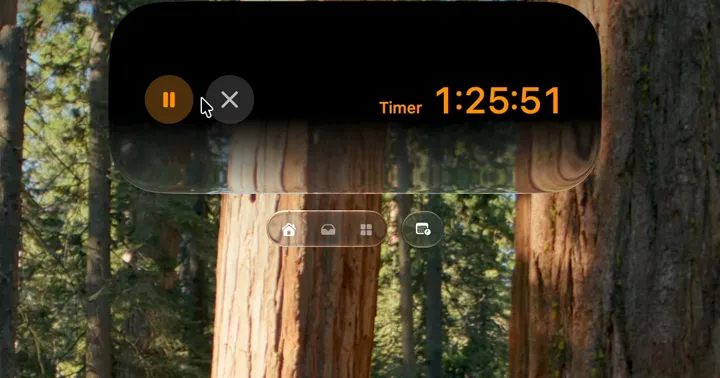
Droppy's Pomodoro Droplet lets me pick a duration from the Shelf and start it there. While it runs, the active timer shows the remaining time with pause and stop controls. Droppy also has a stopwatch mode for work where I want to measure a session without deciding its length first. Those are separate modes, so I can choose a countdown for a bounded block and the stopwatch for an open-ended review.
Use sound as a boundary, not as decoration
Consistent background sound can become a useful start signal. Droppy can optionally play an ambient sound when its timer starts. The Pomodoro settings include a sound picker and volume control, and the sound pauses and resumes with the timer. I keep it low enough that it does not become the subject of the session.
This is optional for a reason. If silence helps, leave it off. If rain or another steady sound makes it easier to stop noticing the room, use it as part of the ritual: timer starts, sound begins, one task gets the foreground.
Protect the middle of the block
When something unrelated appears, do not solve it immediately and do not rely on memory. Put it in a short parking list, then return to the chosen outcome. This keeps the timer from turning into twenty-five minutes of reacting to whatever arrived last.
There are exceptions. A call you need to take or a genuinely urgent problem can interrupt the session. Pause the countdown rather than letting it finish while you are elsewhere. Droppy's countdown and stopwatch can both be paused and resumed, and its optional ambient sound follows that state. When you come back, the remaining block is still honest.
Make the break a change of state
A five-minute break spent scrolling in the same chair does not feel like much of a break. Stand up. Look away from the display. Refill water. Let the next session begin from a different physical state.
Before leaving, write one line about where to restart. “Next: test the mobile menu” is enough. That line preserves the mental context you would otherwise spend the first minutes rebuilding.
Keep the loop simple
My practical loop is four steps: choose one outcome, choose a realistic duration, protect the block, then take a real break. After a few sessions, take a longer break or stop. If the planned outcome finished early, I end the block rather than filling it with random small work just to satisfy the clock.
If I lock the Mac during a longer session, Droppy can optionally show the active Pomodoro countdown as a Lock Screen status widget when that widget is enabled. That is useful for a break away from the desk because I can check the remaining time without reopening the working context.
Adjust the interval, keep the boundary
The useful part of Pomodoro is not the number twenty-five. It is the visible boundary around one piece of work. If twenty-five minutes always ends just as you settle in, use fifty. If starting is the hard part, use ten. If you need to learn how long a task really takes, use the stopwatch.
A good focus system should reduce negotiation, not create more of it. Pick the next outcome, start the timer, and let that one decision hold until the block ends.
The other thing that ruins a block is the call you did not see coming. Joining a meeting without hunting for the link puts the time left on a ring so the meeting takes the minutes it was given, and no more.