


The Mac Lock Screen occupies the whole display and does almost nothing with it. It shows the time, the account, and the authentication controls. That restraint is good for security, but it leaves useful, already-running state hidden: the song playing through the speakers, the timer you started, the next event, or the volume you are trying to lower before logging back in.
Droppy augments that screen with information and controls that make sense while the Mac is locked. Album art, playback controls, timed lyrics, status widgets, and optional volume and brightness sliders can appear around the existing lock experience. Authentication remains macOS's job. Droppy does not replace the password field, Touch ID, or the system boundary.
The useful question is not how much can fit on the Lock Screen. It is what you might reasonably need before unlocking.
Now Playing belongs on a screen you can see
Music often continues after the Mac locks. The stock screen gives that ongoing session very little presence. Droppy's media panel can show the current album artwork, track information, progress, and playback controls on the Lock Screen.
That turns the screen into a legible Now Playing surface rather than a large wallpaper with a small clock. You can see what is playing and handle a frequent control without opening the music app after unlocking.
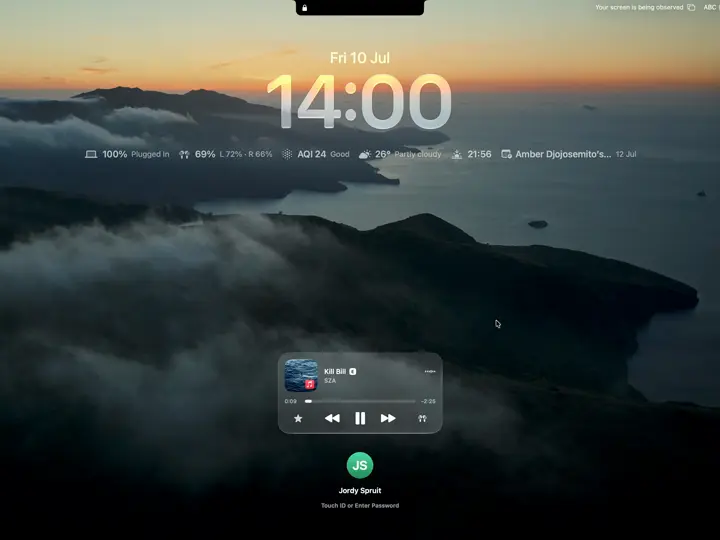
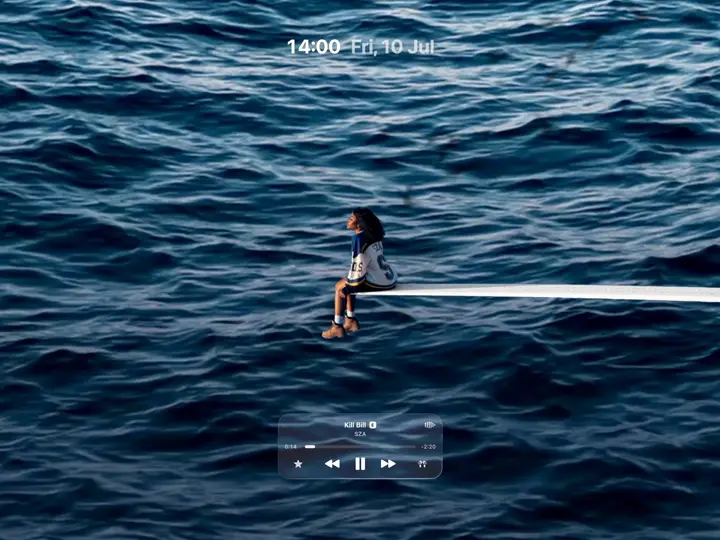
The panel supports a compact state and an expanded artwork presentation. That choice matters because not every desk wants the same thing. A work Mac in a shared room may suit a restrained player. A personal music setup can use the display as part of the listening experience.
Animated artwork, with a clear source limit
For Apple Music songs that include editorial motion artwork in Apple's catalog, Droppy can play that animated cover in the expanded Lock Screen panel. It is a specific media source, not an effect Droppy invents for every album.
Spotify and browser media keep the static album cover. That is the honest boundary. Motion artwork depends on the source providing a compatible asset. When it is available, the Lock Screen feels alive in a way that matches the release. When it is not, a sharp static cover is better than fake animation.
Timed lyrics when listening is the activity
Droppy's Lock Screen lyrics use a centered, timed stack that follows playback. This is useful when the Mac is playing music but not being actively used: across a room, beside a keyboard, or during a break from the desk.
Lyrics depend on a matching timed source. They will not be perfect for every track, alternate recording, live version, or obscure release. When the match is unavailable, the Lock Screen should remain a media panel rather than showing misleading words.
If lyrics are distracting, leave them off. The feature makes sense when following the song is part of the moment, not as a permanent layer over every lock.
A status widget answers one glanceable question while the Mac waits for authentication.
Album art, progress, and playback controls keep a music session visible after the Mac locks.
What surfaces before login is a privacy choice, so a home Mac and a shared office can differ.
Authentication stays with macOS; these surfaces only add useful state around the lock.
Status widgets for information that survives the lock
A Lock Screen widget should answer a glanceable question. How long is left on the timer? What is the next calendar item? What is the current weather or air quality? Which ongoing activity still needs attention?
Droppy can show selected status widgets while locked. The goal is continuity: a state that started before locking does not become invisible just because the Mac is waiting for authentication. The widgets refresh at a pace suited to status rather than treating the Lock Screen like an always-running dashboard.
Choose widgets carefully. Calendar details and notifications can reveal information to anyone who can see the display. A personal Mac at home and a work Mac in a public office need different settings. Useful before login does not mean appropriate before login.
Volume and brightness without a login detour
Pressing a volume or brightness key while locked is a simple request, but the stock visual feedback is not designed as part of a larger Lock Screen experience. Droppy offers custom iOS-style sliders that enter from the side and respond to the Mac's volume and brightness keys.
Each slider can be enabled independently in Lock Screen settings. That matters because the two controls have different value on different hardware. A desktop display may not expose brightness in the same way as a MacBook panel. A Mac connected to external audio may make the volume control more useful than brightness.
The first key press presents a wider control, and follow-up changes can use a slimmer state that gets out of the artwork. It provides feedback without leaving a large overlay sitting over the screen.
Operation one: check battery and weather before login
The compact capture shows the useful status row directly below the time. Battery state is visible, including a plugged-in 100% reading. The same line shows AQI 24 marked Good, weather at 26 degrees and partly cloudy, a time for the next daylight change, and an upcoming calendar item.
That is enough to answer a quick question without entering the password. It also shows why widget selection is a privacy choice: status can be useful while a detailed calendar title may be more than you want visible.
Operation two: pause music while the Mac stays locked
The media card in the compact state identifies Kill Bill by SZA and shows progress plus previous, pause, and next. Pressing pause acts on the current track while the account avatar and the Touch ID or password instruction remain below. The screen is still locked.
Droppy is adding a permitted media control around the lock experience, not creating a route into the desktop. Resuming work still goes through macOS authentication.
Operation three: read the track state in expanded artwork
The expanded state switches to a full artwork presentation. The ocean artwork fills the screen, but the track does not become anonymous: Kill Bill, SZA, playback progress, and the control row remain visible at the bottom, with time and date at the top.
That state is for media information while locked. The compact state is better when battery and weather matter. The expanded state is better when the current release and controls are the main information. Neither changes who owns authentication.
Presentation choices should match the room
There is no universal good Lock Screen. The expanded album presentation is great on a personal desk and too much on a shared office screen. Lyrics can be delightful during listening and noisy during work. Widgets can reduce unlocking or expose schedule details. Custom sliders can feel coherent on a MacBook and be irrelevant on an external setup.
Start with one layer. Enable the media panel if music continues while locked. Add a timer widget if focus sessions regularly cross a lock. Turn on only the slider you use. Expand the artwork after the compact version has proved useful.
What Droppy does not replace
Droppy does not create a second lock system. macOS still owns authentication, user switching, Touch ID, passwords, and the decision to unlock. The extra controls do not grant access to documents or apps. They augment the visible surface around the system Lock Screen.
That distinction is important for expectations. A Lock Screen extension can expose selected media and status. It cannot make every app interactive before login, and it should not. The security boundary is more important than convenience.
The honest fit
Droppy's Lock Screen is a good fit if your Mac plays media while locked, you run timers or status widgets, or you keep a docked display visible during the day. It is especially useful when the screen is part of the room rather than something you see only while typing a password.
If you lock only for a few seconds, never play media, and prefer the least possible information before authentication, the stock Lock Screen is already right. Leave Droppy's extras off. A useful Lock Screen is not the one with the most features. It is the one that answers one or two questions without asking you to log in.